This article may contain affiliate links. We may earn a small commission at no extra cost to you if you make a purchase through these links.
Google Mixboard Goes Global: AI Moodboards Hit 180+ Countries
Google's AI-powered Mixboard expands to 180+ countries with bigger canvases and Nano Banana image generation. Here's what it means for creators.
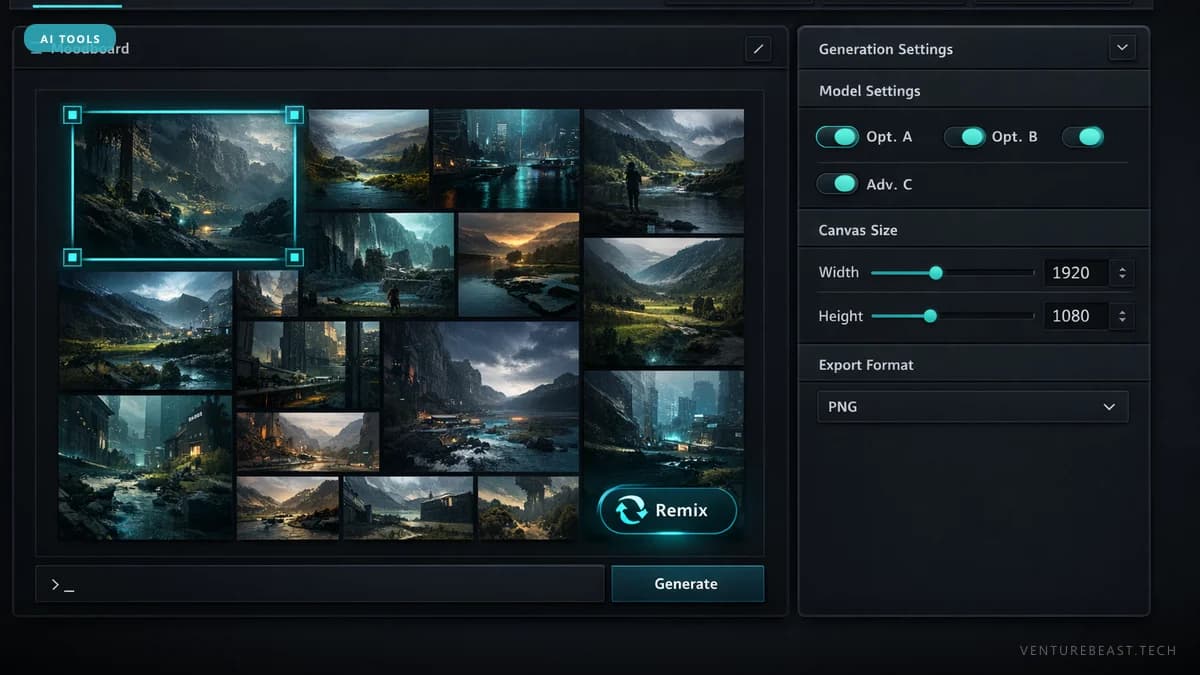
Google Mixboard, the AI-powered visual brainstorming tool from Google Labs, is now available in over 180 countries — a massive expansion from its limited September 2025 launch. Powered by Gemini AI and the Nano Banana image model, Mixboard lets users create, remix, and refine visual ideas on collaborative canvases that are now four times larger than before.
The global rollout positions Mixboard as Google's answer to the growing demand for AI-assisted creative tools. But unlike Canva or Adobe Express, Mixboard isn't trying to be a polished design suite. It's a deliberately rough "digital workshop" built for the messy early stages of creative work — when you have a vague idea and need to see it take shape before committing to a final design.
What Is Google Mixboard?
Google Mixboard is an experimental AI-powered canvas tool available through Google Labs. Users upload photos, insert text, and use AI to generate and remix visual content on a shared digital board. The tool runs on two core AI systems:
- Google Gemini — handles natural language understanding, content suggestions, and creative direction interpretation
- Nano Banana (Gemini 2.5 Flash Image) — Google's image generation and editing model that lets users tweak visuals with simple text instructions
As of April 2026, Mixboard remains a Google Labs experiment — not a fully productized Google service. This distinction matters because Labs experiments can be discontinued, and feature sets may change significantly before (or if) they reach general availability as a standalone product.
What's New in the Global Rollout?
The expansion from a limited launch to 180+ countries brings several practical improvements beyond geographic access:
| Feature | At Launch (Sep 2025) | Global Rollout (2026) |
|---|---|---|
| Availability | Limited countries | 180+ countries across Asia, Africa, Latin America, and more |
| Canvas Size | Standard | Up to 4x larger |
| AI Model | Gemini + early image gen | Gemini + Nano Banana (Gemini 2.5 Flash Image) |
| Export & Sharing | Basic | Improved export and sharing functionality |
| Privacy | Standard | Explicit opt-in only for AI model training |
The 4x canvas expansion is the most practical upgrade. Larger boards mean more room to spread out reference images, sketches, notes, and AI-generated variations without running into spatial constraints — a real limitation of the original version that made complex brainstorming sessions feel cramped.
Privacy handling deserves attention too. Google has designed Mixboard so that user uploads only improve AI models if users explicitly opt in. Content remains account-bound unless shared — a meaningful commitment for users working on sensitive early-stage creative projects or unreleased product concepts.
What Does Mixboard Actually Do Well?
Mixboard's strength is low-friction creative exploration. Users report practical applications including:
- Event planning — visualizing party themes, decor combinations, and layout ideas
- DIY project visualization — seeing how home renovation concepts or craft ideas might look before committing to materials
- Storyboarding — mapping out visual narratives for content creators and marketers
- Design concept brainstorming — exploring brand directions, product designs, and aesthetic variations
The Nano Banana AI model integration is what differentiates Mixboard from a basic digital whiteboard. Instead of manually sourcing reference images, users describe what they want and let the AI generate variations. They can then upload their own images and have the AI adapt, extend, or remix them — creating a feedback loop between human direction and AI execution that speeds up the ideation cycle significantly.
How Does Mixboard Compare to Canva and Pinterest?
The temptation is to compare Mixboard directly to Canva, Pinterest, or even Figma. But Google is positioning it in a different lane — and that positioning is deliberate.
| Tool | Primary Purpose | AI Role | Output Quality |
|---|---|---|---|
| Google Mixboard | Early-stage brainstorming | Core — generates and remixes content | Rough concepts, not production-ready |
| Canva | Design production | Assistive — templates, text generation | Publication-ready designs |
| Inspiration curation | Recommendation — surfaces related content | Curated collections of existing content | |
| Figma / Adobe | Professional design | Assistive — auto-layout, prototyping AI | Production-grade assets |
Mixboard occupies the space before you open Canva or Figma. It's where you figure out what you want to build, not where you build it. Google describes it as a "digital workshop" — a place to get your hands dirty with ideas before committing to polished execution.
This pre-design positioning could prove strategic. The AI creative tool market is crowded at the production end, but the ideation stage — where most projects stall — remains underserved by purpose-built tools. Most people brainstorm in Google Docs, random Pinterest boards, or group chats. Mixboard gives that process a structured, AI-powered upgrade.
Where Does Mixboard Fit in Google's AI Creative Stack?
Mixboard is part of a broader push by Google to build AI-powered creative tools across multiple media formats. As of April 2026, Google's creative AI portfolio includes:
- Mixboard — visual brainstorming and moodboarding
- Nano Banana (Gemini 2.5 Flash Image) — AI image generation and editing
- ProducerAI — AI music creation using the Lyria 3 model
- Google Veo — AI video generation from text prompts
- Gemini in Chrome — AI-assisted browsing and content interaction
The pattern is clear: Google is layering AI creative capabilities across visual, audio, and video formats — all connected through the Gemini model family. Mixboard serves as the ideation layer in this stack, feeding into more specialized production tools.
For a deeper look at how the earlier version of Mixboard fits into creative workflows, see our previous analysis of Google Mixboard's creative velocity framework.
Who Should Use Google Mixboard?
Good fit
- Content creators and marketers who need to rapidly explore visual directions before committing to production
- Small business owners planning events, product presentations, or brand explorations without design expertise
- Students and educators looking for a free, accessible tool for visual project planning
- Anyone in the "I have an idea but can't visualize it" stage of a creative project
Not the right fit
- Professional designers who need pixel-perfect production output
- Teams requiring robust collaboration with version history, commenting, and approval workflows
- Enterprise users who need SLA guarantees — Labs experiments don't offer these
The Bottom Line
Google Mixboard's expansion to 180+ countries signals that Google sees real value in the pre-design brainstorming space — a stage of creative work that most tools skip entirely. The combination of Gemini AI for understanding creative intent and Nano Banana for visual generation makes it genuinely useful for early ideation, even if the output isn't production-ready.
The biggest risk isn't functionality — it's durability. Google's track record of discontinuing products makes any Labs-stage tool a risky workflow dependency. Use Mixboard for what it's good at — fast, messy, AI-assisted brainstorming — but keep your production pipeline on more established tools.
Frequently Asked Questions
Is Google Mixboard free to use?
As of April 2026, Google Mixboard is free and available through Google Labs at labs.google.com. You need a Google account to sign in, and the tool must be available in your country. Since it's an experimental product, pricing could change if Google decides to productize it fully.
What AI models power Google Mixboard?
Mixboard uses two AI systems: Google Gemini for understanding natural language prompts and creative direction, and Nano Banana (also known as Gemini 2.5 Flash Image) for generating and editing images. Together, they allow users to create and remix visual content through text instructions.
Can Google Mixboard replace Canva or Figma?
No. Mixboard is designed for early-stage brainstorming, not polished design production. It occupies the ideation space before you open Canva or Figma. The output quality is meant for exploring concepts, not creating final deliverables. Use it to figure out what you want to build, then switch to production tools.
Does Google use my Mixboard uploads to train AI?
Only with explicit opt-in consent. Google has designed Mixboard so that user uploads improve AI models only if users choose to allow it. Content remains tied to your account and is not shared or used for training unless you specifically grant permission.
Is Google Mixboard available in my country?
As of the latest expansion, Mixboard is available in 180+ countries across Asia, Africa, Latin America, Europe, and other regions. Visit labs.google.com/mixboard to confirm availability in your location by signing in with your Google account.
Enjoying this article?
Get more strategic intelligence delivered to your inbox weekly.
Enjoyed this article?
VentureBeast.Tech is independent and reader-supported. If this saved you time, you can buy us a coffee — it keeps the research deep and the site ad-light.
Support us on Ko-fi
Comments (0)
No comments yet. Be the first to share your thoughts!